
DATA AND ACCOUNT DELETION – MUYA
Account and user-data deletion policy
The MUYA app is provided by Sopraya Sp. z o.o. (ul. Krasińskiego 20, 64-800 Chodzież, Poland). Below is how to request deletion of your account or of selected data.
1. Delete your account and all associated data
You can delete your account in two ways:
- In the app: Profile → Account → “Delete account”, then confirm.
- By email: write to hi@muya.app from the address linked to your account, requesting deletion.
What happens after your request
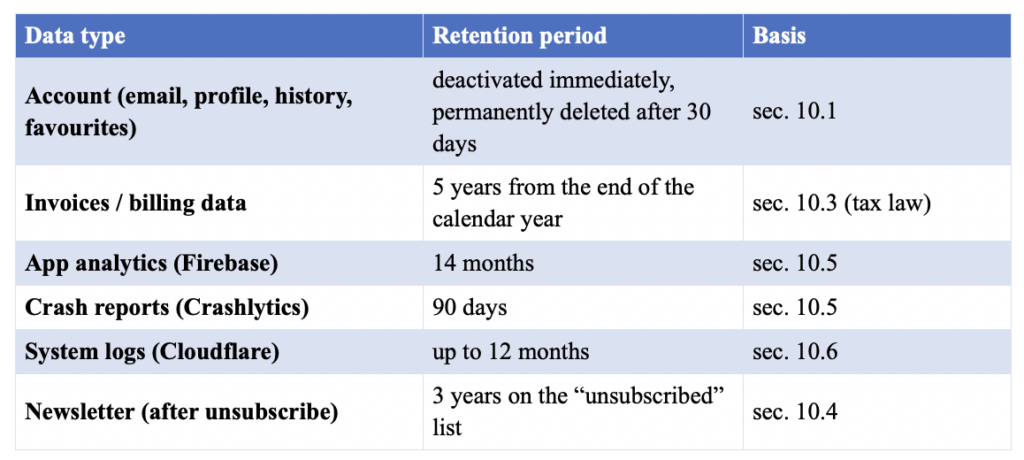
- Immediately – the account is deactivated (you can no longer sign in).
- After 30 days – the data is permanently erased from active databases (automated process).
Data we delete
Email address, name, user ID, session playback history, favourites, preferences and account-linked analytics.
Data we retain (legal / security)
- Billing and invoice data – 5 years (tax and accounting law).
- Technical and security logs – up to 12 months (anonymised).
- Backups – until the backup retention cycle ends; data is never restored to production systems.
2. Delete selected data without deleting your account
To delete only part of your data while keeping your account, email hi@muya.app and specify which data should be removed (e.g. session history, analytics data). We act without undue delay, within 1 month at the latest (right to erasure, GDPR art. 17).
You can also disable the collection of analytics and diagnostics data at any time in the app: Profile → “Analytics and diagnostics”.
3. Contact
Sopraya Sp. z o.o. – hi@muya.app. Full terms: Privacy Policy (link to the /privacy/ page).
Data retention periods (source: Privacy Policy v1.0, sec. 10)